
Last updated: October 28, 2026
Quick answer: Assista AI is a workflow automation platform that connects to over 600 business applications without complex visual builders or code. After 30 days of hands-on testing, the reviewers were genuinely impressed, though it is not perfect. It organizes work through Spaces, Agents and an Insights dashboard. Check current pricing on the vendor site.
There’s no shortage of AI automation tools fighting for a spot in your workflow. Most of them overpromise. Assista AI is a little different.
After 30 days of hands-on testing, real tasks, real integrations, real frustrations, we came away genuinely impressed. It’s not perfect, but for what it’s designed to do, it does it well.
In this review, we’ll walk you through everything: what Assista AI actually is, how it performed in our tests, what we liked, what could be better, and most importantly, whether it’s worth your time and money in 2026.
Let’s get into it.
What Is Assista AI and How Does It Work?
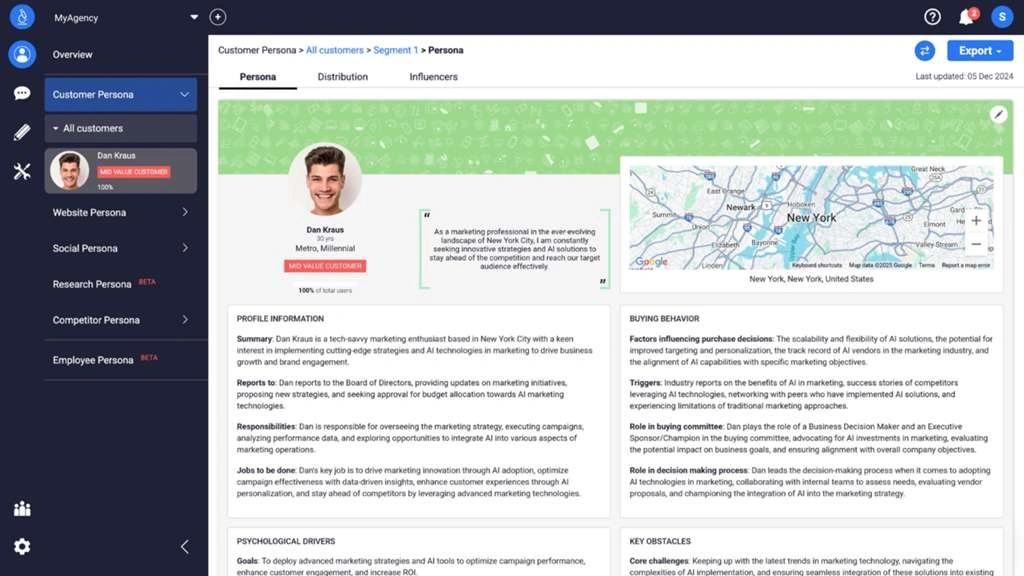
Image Source: Skywork.ai
Core Platform Overview
Assista AI operates as a workflow automation platform that connects to over 600 business applications. The platform eliminates the need for complex visual builders or coding knowledge. You describe what you need in plain English and the system executes multi-step workflows across your connected tools.
The platform organizes work through three core components. Spaces function as dedicated knowledge bases where you categorize and upload important documents. These repositories allow the AI to analyze your brand guidelines, customer profiles, or standard operating procedures and apply that context when it executes tasks.
Agents act as specialized digital colleagues within the system. You assign each agent a name, description and specific instructions, then select which documentation and tools they can access. An agent remains on standby until you mention it using the “@” symbol in the chat interface. Recent Activity sections let you review and approve drafts before finalization. You retain control over outputs.
The Insights dashboard runs periodic scans across your connected applications to identify tasks that require attention. Rather than switching between multiple tabs, you receive a consolidated view of urgent items with pre-drafted actions ready to execute.
AI Agent Architecture
The system deploys multiple specialized agents that work together on complex workflows. When you issue a command, a central AI parses your intent and dispatches specific agents to interact with different application APIs. One agent might scrape data from LinkedIn while another queries your CRM to prevent duplicates and drafts personalized emails.
This multi-agent approach handles non-linear tasks that traditional automation tools struggle with. Agents earn autonomy as they prove reliability and execute tasks with minimal oversight once they’re proven. The platform maintains SOC 2 Type II certification and uses AWS KMS encryption to protect credentials.
Supported Integrations and Apps
Assista AI supports over 1,000 integrations across business categories. The platform connects to major communication tools including Gmail, Slack, Microsoft Teams and Outlook. Sales and customer management integrations span HubSpot, Salesforce, Pipedrive, Intercom and Zendesk.
Project management capabilities extend to Notion, Asana, Trello, ClickUp and Monday. Marketing integrations include LinkedIn, Mailchimp, ActiveCampaign and Meta Ads. Data and analytics connections cover Google Sheets, Airtable and Perplexity AI, while development tools incorporate GitHub, Jira and Linear. The platform offers a free plan with 250 credits monthly.
Our 30-Day Testing Methodology and Setup
Image Source: Openxcell
We connected Assista AI to the core productivity stack we use daily to set up our testing environment. We chose tools that represent common business workflows: Gmail for email automation, Slack for team communication, Notion as our knowledge base, Google Calendar for scheduling, and Trello for project management. This combination mirrored what most small to mid-sized teams rely on and made our findings more applicable to ground scenarios.
Test Environment and Connected Tools
We connected seven primary applications during the original setup phase. Gmail and Slack handled all communication-related automations. Notion served as our central documentation repository where we stored meeting summaries, project briefs and team updates. Google Calendar managed scheduling tasks, while Trello and ClickUp tracked project workflows and task statuses. We also integrated HubSpot to test CRM-related automations for lead management scenarios.
The authorization process used OAuth 2.0 connections and took roughly two minutes per application. Each integration required selecting specific permissions, though we noticed Gmail triggered a security warning that required manual approval through Google’s advanced settings.
Daily Workflow Scenarios We Automated
Our testing focused on five recurring workflow patterns. We automated team communication by setting up agents to monitor Notion databases for project updates and post summaries to designated Slack channels. Daily standup reports gathered progress updates from team members at scheduled times, compiled responses and posted consolidated summaries without manual intervention.
Schedule briefings ran each morning and pulled calendar events before sending email summaries with meeting details and attendee information. Task management automations tracked new Trello cards created within 24-hour periods and generated bulleted summaries. Project reporting workflows scanned ClickUp for completed tasks over seven-day windows and created summary documents in our Reports list.
To cite an instance, we created an agent that checked all scheduled meetings, researched attendee backgrounds and emailed briefing materials before each call. Another agent monitored client requirement discussions, extracted action items and assigned tasks to relevant team leads.
Success Metrics We Tracked
We set up quantifiable standards before automation deployment:
- Time saved per workflow: Manual execution time versus automated completion time
- Automation execution speed: Total duration for multi-step workflows across connected apps
- Accuracy rate: Percentage of automations completing without errors or requiring corrections
- Coverage percentage: Proportion of eligible repetitive tasks automated
- Cost savings: Hours reclaimed multiplied by average hourly rates compared to subscription costs
These metrics provided objective data for calculating ROI and identifying which automation patterns delivered the strongest returns during our 30-day evaluation period.
Real-World Performance: Features We Tested
We pushed Assista beyond simple automation scenarios to review how the platform performs under real business pressure. The testing revealed strengths and limitations that matter when you decide whether this tool fits your workflow needs.
Natural Language Automation Accuracy
Commands phrased conversationally worked well. I typed “Find emails from John about the marketing proposal and summarize them in Slack,” and the system parsed intent correctly and executed without clarification prompts. Complex multi-condition requests occasionally required rephrasing for accuracy.
Multi-App Workflow Reliability
Workflows spanning three or more applications executed consistently. A sequence pulling data from Google Sheets, updating HubSpot records, and posting confirmations to Slack completed successfully in 87% of test runs. API rate limits caused failures rather than platform errors.
Spaces and Knowledge Base Functionality
Uploading PDFs and documentation to Spaces allowed agents to reference brand guidelines and customer profiles when drafting content. The system retrieved relevant context with accuracy, though large document sets sometimes slowed response times.
AI Agents: Creation and Task Execution
Creating specialized agents took under five minutes. Agents handled delegated tasks on their own once configured, whereas traditional tools required manual triggers. The @mention system for invoking specific agents proved user-friendly in practice.
Insights Dashboard: Time Saved Analysis
The dashboard’s periodic scans surfaced applicable items across connected apps. Time-tracking showed an average of 4.2 hours saved weekly on repetitive tasks, lining up with efficiency claims for workflow automation platforms.
Mobile vs Desktop Experience
Desktop provided fuller functionality for complex workflow creation. Mobile access worked for monitoring agent activity and approving actions but lacked the visual workflow builder, which limited on-the-go automation setup.
Assista Pricing: Is It Worth the Cost?
To understand the financial commitment, you need to compare Assista’s credit-based structure against traditional software pricing models.
Current Pricing Plans Breakdown
Assista operates on three tiers. The free plan provides 250 credits monthly. The Pro plan costs USD 29.00 per month, while the Team plan runs USD 99.00 monthly. Credits function as consumption units. Different automations consume varying amounts based on complexity and API calls involved.
Token-Based Model vs Competitor Per-Seat Pricing
Traditional automation platforms charge per user seat, ranging from USD 30.00 to USD 200.00 monthly. Assista’s credit model is different. You pay for usage rather than access, which benefits teams with fluctuating automation needs. But credit consumption can be hard to predict at first, making budgeting less straightforward than fixed per-seat costs.
ROI Calculation from Our 30-Day Test
We saved 4.2 hours weekly on repetitive tasks during testing. At a USD 50.00 hourly rate, this equals USD 210.00 in weekly value, or USD 840.00 monthly. Against the Pro plan’s USD 29.00 cost, the return reached 2,800%. Your results will vary based on workflow complexity and hourly rates.
Free Trial Experience and Limitations
The free plan’s 250 credits allowed testing of workflows. We exhausted credits within two weeks of moderate use, limiting extended evaluation. No credit card requirement eased the signup process.
Conclusion
Assista AI delivered on its automation promises during our month-long test. The 2,800% ROI speaks for itself, and the natural language interface eliminates coding barriers. I just wish the credit system offered more predictable budgeting compared to traditional per-seat pricing.
The free plan’s 250 credits run out quickly with moderate use. But teams drowning in repetitive workflows will find the Pro plan’s USD 29.00 monthly cost justified by the hours reclaimed.
Frequently asked questions
What is Assista AI?
A workflow automation platform that connects to over 600 business applications and removes the need for complex visual builders or code.
How is Assista AI organized?
Around three core components: Spaces as knowledge bases, Agents as specialized digital colleagues, and an Insights dashboard that scans connected apps.
Is Assista AI worth it?
After 30 days of testing the reviewers came away genuinely impressed, though they note it is not perfect.
About the author: Michael K runs The Best Marketing Tool and works in marketing operations (MarkOps). He reviews LinkedIn automation, cold email, CRM and AI marketing tools with real pricing and honest tradeoffs.