
Managing social media for a small team often means one person is doing the job of five, writing content, designing visuals, responding to comments, and somehow keeping a consistent posting schedule across four platforms. That’s where social media scheduling tools come in. The right tool doesn’t just save you time; it brings structure to your content calendar, keeps your brand visible even on your busiest days, and lets your team collaborate without stepping on each other’s toes. In this guide, we’ve tested and shortlisted the 7 best social media scheduling tools for small teams in 2026 so you can stop juggling tabs and start focusing on what actually moves the needle.
Sprout Social
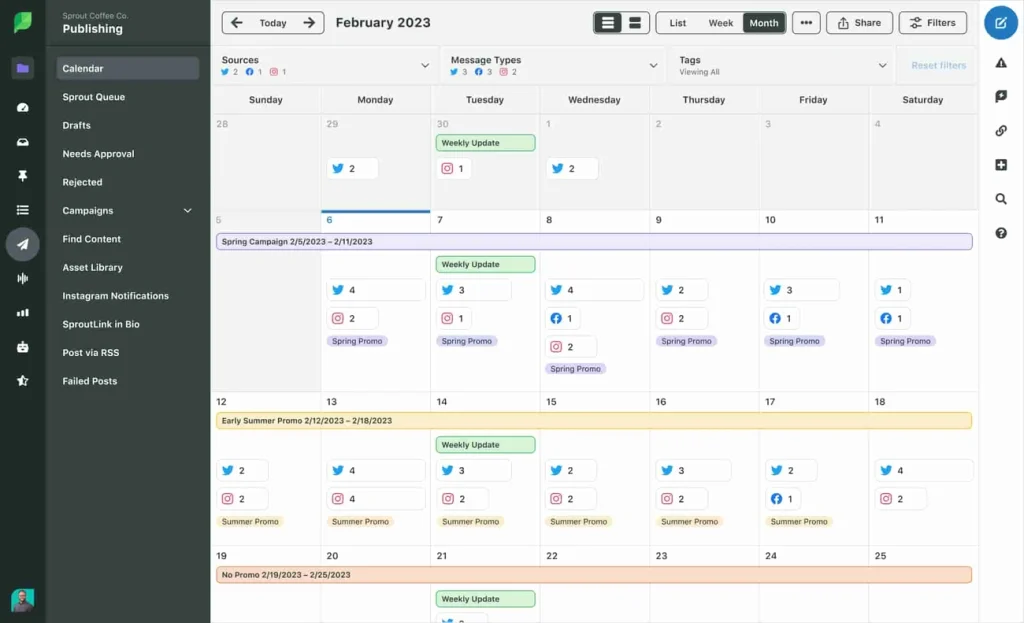
Image Source: Sprout Social
Sprout Social positions itself as the platform for teams that want to stop switching between tabs and start managing everything from one dashboard. Trusted by over 30,000 brands, this all-in-one social media scheduler handles publishing, analytics, engagement, and reporting across every platform you use. The company has built its reputation on serving nearly 10,000 small and medium-sized businesses, which speaks to its capacity to scale with growing teams.
Key Features
The Smart Inbox combines every comment, DM, and mention from all your social platforms into a single feed. You manage conversations in one place rather than jumping between Instagram, Facebook, and X separately. The system filters messages by keyword, assigns them to teammates, and tags conversations for follow-up. Reactive customer service turns into an organized workflow where nothing gets missed.
ViralPost® uses AI to identify optimal posting times based on your audience’s activity patterns. The technology analyzes when your followers are most active and schedules content for maximum engagement. You remove the guesswork from timing and your posts reach people when they’re online.
Social listening works as an AI-powered monitoring system that surfaces brand mentions, competitor activity, and trending topics before they peak. You can track conversations across social platforms, blogs, and forums by setting up keyword and hashtag alerts. The sentiment analysis feature tells you whether people support your brand or just tolerate it and gives you practical insights for strategy adjustments.
The analytics tools translate raw engagement data into reports you can present to stakeholders. You can tag posts by campaign to measure ROI at the campaign level rather than just tracking individual post performance. The platform integrates with Google Analytics to show which social posts drive website traffic and connects your social efforts to tangible business outcomes.
Pricing
Sprout Social uses a per-user, per-month model with annual billing:
| Plan | Monthly Cost | Social Profiles | Key Additions |
|---|---|---|---|
| Essentials | $79/user | 5 profiles | Basic publishing and analytics |
| Standard | $199/user | 5 profiles | Smart Inbox, review management, mobile app |
| Professional | $299/user | Unlimited | Competitive reports, message tagging, trend analysis |
| Advanced | $399/user | Unlimited | Chatbots, automation, helpdesk integrations, CSAT surveys |
| Enterprise | Custom | Unlimited | 24/5 support, social listening, premium analytics |
Add-ons for Premium Analytics, Social Listening, and Employee Advocacy are priced separately and can increase total contract value by a lot. Month-to-month billing is available at higher rates.
Pros and Cons
Sprout Social delivers enterprise-grade capabilities in an interface that doesn’t require weeks to learn. The unified inbox changes how you handle customer relationships by providing conversation history across all platforms. One marketing team reported a 126% increase in engagements across Facebook and Twitter over a two-month period after implementing the platform. Whether you’re managing three accounts or 300, the system grows with your needs.
The analytics stand out as useful rather than just visually appealing. You get customizable reports, competitor benchmarking, and sentiment tracking that inform decisions. Team collaboration features like task assignment and approval workflows keep everyone aligned without endless messaging threads trying to figure out who posted what.
Because of the pricing structure, smaller businesses often struggle to justify the investment. The Standard plan sits at the higher end compared to alternatives at $199 per user monthly. The entry-level plan caps you at five social profiles, which becomes restrictive if you manage multiple brands or client accounts. Advanced features like sophisticated analytics and automation are reserved for higher-tiered plans and force upgrades sooner than expected. Customer support experiences vary, with some users reporting slow response times and communication gaps.
Best For
Sprout Social works best for small teams managing 15+ hours of social media work weekly who need unified management across multiple platforms. Agencies handling several client accounts benefit from the workflow automation and white-label reporting capabilities. Growing businesses that want to prove social media ROI to leadership will find the analytics depth justifies the cost. The investment doesn’t make sense if you’re posting occasionally and checking comments when you remember. The platform shines when you can use the Smart Inbox, social listening, and team collaboration tools rather than just scheduling.
Buffer Social Media Scheduling
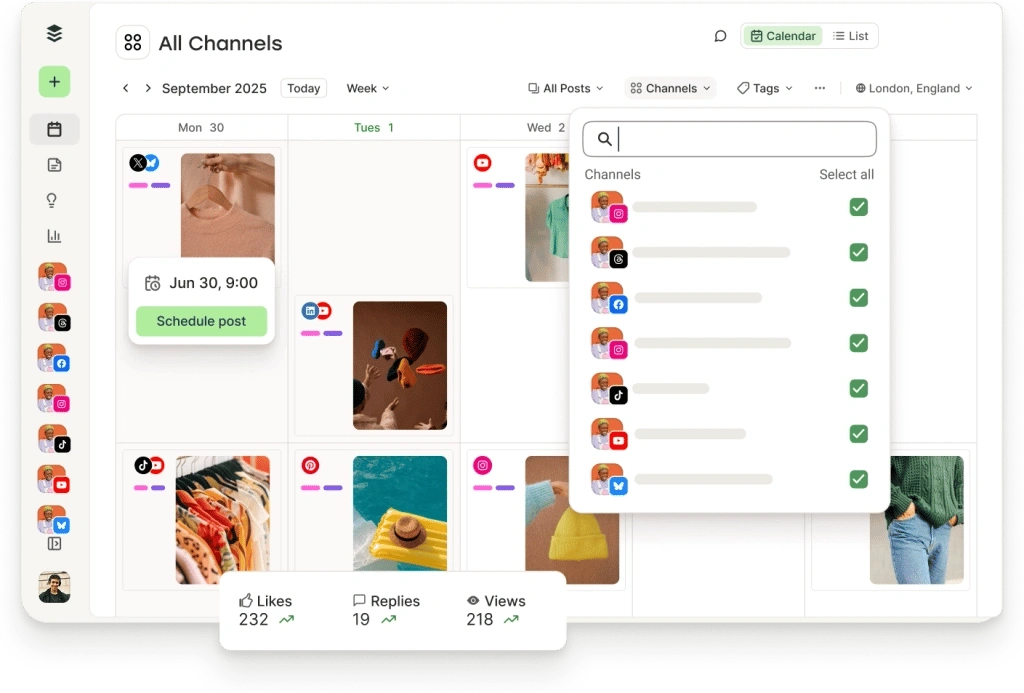
Image Source: Buffer
Buffer built its name on a simple promise: social media scheduling shouldn’t require a manual to understand. Over 100,000 businesses and 226,171 active users use the platform, which focuses on making content planning feel less like project management and more like a natural part of your workday. The tool supports 11 social platforms including Instagram, TikTok, Facebook, X, Pinterest, LinkedIn, YouTube Shorts, Google Business Profile, Bluesky, Mastodon, and Threads.
Key Features
Create Space functions as a content idea repository where you store drafts, templates, and half-formed thoughts until you’re ready to schedule them. An AI Assistant sits inside the composer and helps brainstorm post ideas, rewrite copy for different platforms, and adjust tone without switching to external tools. You can highlight existing text and choose to rephrase, shorten, or expand it directly within Buffer’s interface.
A visual content calendar displays scheduled posts across weeks or months and lets you drag and drop to reschedule without opening individual posts. You can schedule up to 2,000 posts at once on paid plans, though the free tier caps you at 10 posts per channel. Buffer shortens links and offers best time to post recommendations based on engagement patterns from your analytics.
Community inbox consolidates comments from Facebook, Instagram, LinkedIn, Threads, Bluesky, X, TikTok, and Google Business Profile into one dashboard. You can reply to Google reviews among social comments, and sentiment analysis flags comments as negative, questions, or order-related to help prioritize responses. Saved replies let you respond faster while you maintain your brand voice.
Start Page creates a customizable landing page for your social bio links and supports YouTube videos, Spotify embeds, image grids, and Mailchimp newsletter forms. This counts as one channel toward your plan limits but eliminates the need for separate link-in-bio services.
Pricing
Buffer charges per social channel with volume discounts as you scale:
| Plan | Monthly Cost | Annual Cost | Channels | Users | Key Features |
|---|---|---|---|---|---|
| Free | $0 | $0 | 3 max | 1 | 10 posts per channel, simple analytics, AI Assistant |
| Essentials | $6/channel | $5/channel | Unlimited | 1 | Unlimited posts, advanced analytics, hashtag manager |
| Team | $12/channel | $10/channel | Unlimited | Unlimited | Approval workflows, access levels, branded reports |
| Agency | $120/month for 10 channels | $100/month for 10 channels | 10 included, $60/year per additional | Unlimited | Higher AI credits, Google Analytics integration |
Volume pricing applies after 10 channels: channels 11-25 cost $4/month each, channels 26-50 drop to $3/month, and channels 51+ cost $1-2/month depending on plan. Nonprofits receive 50% off all paid plans.
Pros and Cons
Buffer excels at making social scheduling available without overwhelming new users. Capterra gives the interface a 4.6/5 ease of use rating, and you can connect accounts and start scheduling within minutes. Every plan includes the AI Assistant free with unlimited usage, unlike competitors that charge separately for AI features. Integration with Canva lets you design graphics and push them directly to your Buffer queue without downloading files.
Per-channel pricing works in your favor when you manage fewer accounts. Three channels on the Essentials plan costs $18 monthly with annual billing, a lot cheaper than flat-rate alternatives. Mobile apps mirror desktop functionality, so you can edit captions and reschedule posts from your phone without limitations.
The pricing model becomes expensive once you manage multiple clients or brands. Ten channels on the Team plan reaches $120 monthly, and at that scale, flat-rate tools offer more features for similar costs. Buffer lacks social listening, meaning you can’t monitor brand mentions outside direct comments or track competitor activity. Analytics cover simple metrics like engagement and reach but don’t provide sentiment tracking across the web or industry standards.
Essentials plan limits you to a single user and forces team upgrades even when you just need one collaborator. Some users report the preview doesn’t always match the final post appearance, and support response times can lag behind expectations. Instagram posts published through Buffer won’t cross-post to Facebook due to API limitations and require separate scheduling for each platform.
Best For
Buffer suits solo creators, consultants, and small businesses managing 3-5 social accounts who want straightforward scheduling without feature bloat. The free plan works well to test strategies across three channels before you commit budget. Freelancers who manage a handful of client accounts benefit from the clean interface and reliable posting. Growing teams that need collaboration tools can access unlimited users on the Team plan, though per-channel costs require careful budgeting as you scale.
Planable
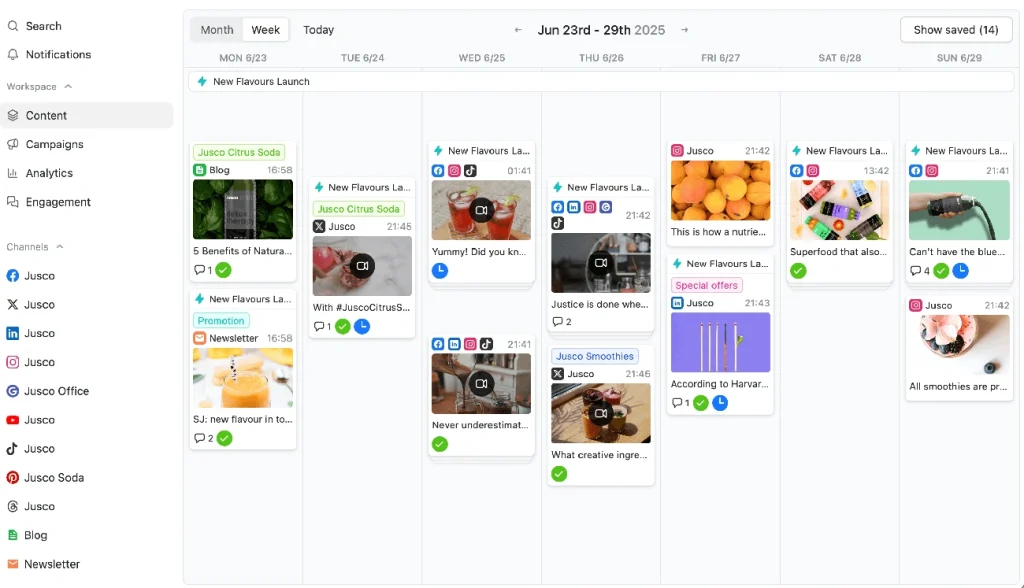
Image Source: Planable
Planable addresses the messiest part of social media scheduling: getting everyone to agree on what gets published. Built for agencies and multi-brand teams, the platform treats content approval as the foundation rather than an afterthought. Over 5,000 brands use Planable, which points to its effectiveness at managing complex workflows where multiple stakeholders need to review posts before they go live.
Key Features
The approval system operates on four customizable workflow types that mirror how your team works. None removes all approval gates when speed matters more than review. Optional approval lets posts go live right away but still allows stakeholders to weigh in. Required approval blocks publishing until designated reviewers give explicit sign-off. Multi-level approval creates assembly-line review processes where content passes through copywriters and managers, then clients sequentially. Each layer requires approval before moving forward.
Workspaces function as dedicated environments for each client or brand. A marketing agency managing five clients sets up five separate workspaces. This keeps content, approvals, and team access isolated. Each workspace connects to all major platforms including Facebook, Instagram, TikTok, LinkedIn, YouTube, Pinterest, X, Google Business Profile, and Threads.
The visual content calendar supports drag-and-drop scheduling across four distinct views. Calendar view displays posts with actual previews rather than text summaries. Grid view simulates Instagram’s native layout. You can rearrange posts until your feed esthetic matches your vision. Feed view shows content exactly as it appears on each platform and eliminates guesswork about final formatting. List view enables bulk actions like approving, scheduling, or deleting multiple posts across workspaces at once.
Collaboration happens inside each post through comments, annotations, and text suggestions as with Google Docs. Version history tracks every change and shows who edited what and when. You can revert modifications. The Canva integration pulls designed assets into Planable with one click, while the built-in media library centralizes all visual assets.
AI-powered tools generate captions, suggest edits, and repurpose content across platforms. The mobile app supports iOS and Android. You can create, review, and approve posts from anywhere. The social inbox add-on consolidates comments and DMs across platforms with AI-generated reply suggestions and sentiment filtering.
Pricing
Planable charges per workspace with unlimited users on all plans:
| Plan | Monthly Cost | Posts/Month | Social Pages | Approval Types | Views Available |
|---|---|---|---|---|---|
| Free | $0 | 50 total (lifetime) | 4 | All except multi-level | Feed, Calendar, Grid |
| Basic | $33/workspace | 60 | 4 | 2 types | Feed, Calendar |
| Pro | $49/workspace | 150 | 10 | 3 types | Feed, Calendar, Grid |
| Enterprise | Custom | Unlimited | Unlimited | All 4 types | All views including List |
Analytics costs an additional $14 per workspace monthly, while the engagement add-on runs $9 per workspace monthly. Annual billing reduces the Pro plan to $49 monthly versus higher month-to-month rates.
Pros and Cons
The workspace pricing model with unlimited users makes Planable budget-friendly for teams. Ten people can collaborate on one workspace without per-seat charges that competitor platforms impose. The approval workflows receive consistent praise. Users highlight how visual previews and contextual feedback eliminate the version control chaos of “final-final-v3” file naming.
The 4.7 out of 5 customer support rating on Software Advice reflects responsive assistance, especially on the Enterprise plan with dedicated account managers. The free plan offers 50 total posts with no time limit. Teams get genuine trial periods to test workflows before committing budget.
The workspace model multiplies costs quickly though. Managing five clients at $49 per workspace reaches $245 monthly on the Pro plan. Post limits of 60-150 per month feel restrictive for high-volume accounts. Analytics and engagement features cost extra rather than being included. The platform lacks social listening capabilities.
Best For
Planable works best for marketing agencies juggling multiple client approval processes who need structured workflows and white-label reporting. In-house teams managing several brands across different regions benefit from workspace separation and customizable approval flows. Growing businesses that prioritize content quality over posting volume will find the approval system prevents rushed, unreviewed posts from going live. Solo creators posting occasionally won’t employ the collaboration features enough to justify the cost.
Loomly
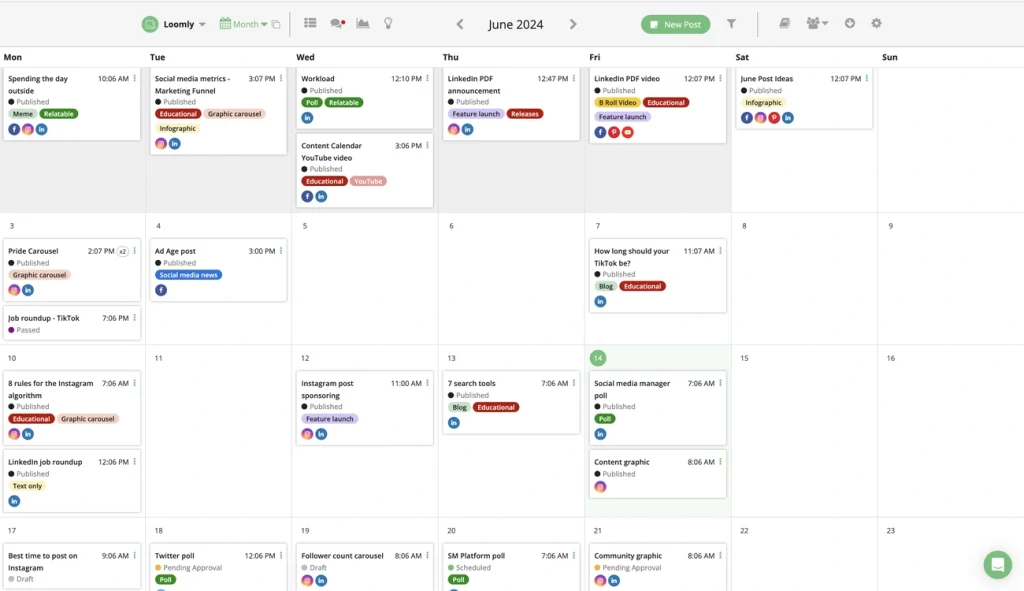
Image Source: Loomly
A French husband-and-wife team created Loomly because they understood what marketers need: a social media scheduler that doesn’t fight you every step of the way. The platform supports nine social networks that have Instagram, Facebook, LinkedIn, X, TikTok, Pinterest, Snapchat, Google Business Profile, and YouTube. Over 5,000 brands use Loomly, with strength among agencies, SMBs, and teams that prioritize smooth teamwork over advanced AI features.
Key Features
The Post Ideas feature surfaces daily content suggestions based on trending events, holidays, and RSS feeds you follow. Loomly presents topical inspiration you might otherwise miss each time you create a post. This breaks through writer’s block without requiring separate research tools. Enterprise users can create custom Post Ideas that arrange with corporate values.
Multi-calendar management keeps client work separated. Agencies that manage multiple brands get dedicated dashboards for each client. This prevents accidental cross-posting and maintains a bird’s-eye view of all content. Each calendar has its own Library to manage approved design assets.
The approval workflow system offers customizable processes where you ping the right stakeholders at the right time. Team roles and precise user permissions ensure content creators, copywriters, managers, and clients all work together without access conflicts. Loomly is one of the few social media scheduling tools offering two users on its Base plan. Even small teams can work together without sharing login credentials.
Post customization options let you tailor content to each platform’s requirements. The in-app Loomly Studio resizes media dimensions to platform specifications and supports platform-specific features like first comments and alt text. It generates post mockups that show how content appears before auto-publishing. Integrations with Canva, Unsplash, and Google Drive bring visuals into your workflow.
Pricing
| Plan | Monthly Cost | Annual Cost | Users | Social Accounts | Key Features |
|---|---|---|---|---|---|
| Base | $42 | $32/month | 2 | 10 | Post ideas, analytics, hashtag manager, approval workflows |
| Standard | $80 | $60/month | 6 | 20 | Advanced analytics, Slack/Teams integration, content export |
| Advanced | $175 | $131/month | 14 | 35 | Custom roles, custom workflows, scheduled reports |
| Premium | $369 | $277/month | 30 | 50 | Custom branding, higher limits |
| Enterprise | Custom | Custom | 31+ | 51+ | Dedicated support, account manager |
Nonprofits receive a 50% lifetime discount. Loomly offers unlimited profile mix, meaning you connect any combination of social platforms without social set restrictions.
Pros and Cons
The user-friendly design earns a 4.7 rating on Software Advice, with users highlighting the minimal learning curve for stakeholders and clients. Customer service averages 30-minute response times. The platform doesn’t charge for essential features like unlimited scheduling and media storage that competitors reserve for premium tiers.
Loomly lacks AI content generation tools. The platform offers post ideas and integrations with creative tools but won’t write captions for you. Instagram publishing requires manual posting rather than direct auto-publishing, which creates extra work when you manage high volumes.
Best For
Loomly works best for agencies that manage multiple client accounts and need separate calendars with approval workflows built in. Small businesses and marketing teams with 2-30 collaborators benefit from the generous user allowances and transparent pricing. The platform suits teams that prioritize content quality and organization over AI-powered content generation.
CoSchedule
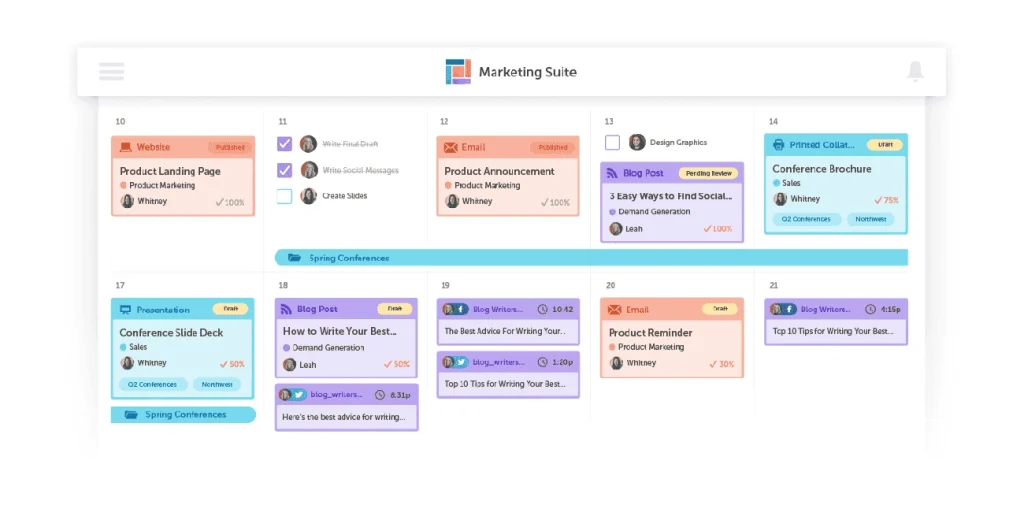
Image Source: CoSchedule
CoSchedule approaches social media scheduling from the opposite direction: instead of building a social tool with calendar features, they built a marketing calendar that handles social media. Used by over 100,000 marketers, the platform functions as a unified system where blog posts, social campaigns, email sends, and events occupy the same timeline. This calendar-centric design appeals to content-focused teams juggling multiple marketing channels at once.
Key Features
The Marketing Calendar serves as your command center and displays every piece of content your team produces through one drag-and-drop interface. Rescheduling a blog post shifts all associated social messages without manual adjustments. Color labels, tags, and filtered views let you segment work by department, campaign, or team member.
ReQueue automates evergreen content promotion by resharing your best-performing posts when gaps appear in your schedule. You define posting frequency and content queues. The system then handles redistribution without duplicate posts cluttering your feed. This especially helps content-heavy blogs that need consistent social activity without daily manual scheduling.
The platform has 1,600+ AI prompt templates to generate social messages, blog ideas, and campaign copy. Hire Mia, CoSchedule’s AI assistant, drafts platform-specific social content following best practices for each network. Best Time Scheduling publishes posts when your audience engagement peaks.
WordPress integration syncs with your blog and lets you schedule posts and create social campaigns from the same dashboard. The Social Inbox combines comments and DMs from Facebook, Instagram, and LinkedIn into one feed. Task templates, approval workflows, and team collaboration features turn the calendar into a project management system for marketing work.
Pricing
| Plan | Monthly Cost | Users | Social Profiles | Notable Features |
|---|---|---|---|---|
| Free Calendar | $0 | 1 | 1 | 15 scheduled messages, basic AI |
| Social Calendar | $19/user | Up to 3 | 3 | ReQueue, bulk upload, analytics |
| Agency Calendar | $59/user | Up to 3 | 5 | Client calendars, white-label reports |
| Content Calendar | Custom | Up to 5 | 5 | Kanban views, campaigns |
| Marketing Suite | Custom | Custom | 5+ | Approval workflows, asset management |
Twitter/X profiles cost $8-$25 monthly as separate add-ons. Additional social profiles run $5 monthly each.
Pros and Cons
The unified calendar gives teams complete visibility of content types rather than isolating social from other marketing work. ReQueue saves hours weekly by automating content recycling. WordPress bloggers especially value the smooth publishing integration.
The pricing structure confuses buyers because multiple product lines overlap in capabilities. User caps of three on lower tiers force expensive upgrades when adding team members. The Marketing Suite entry point starts around $190 monthly, steep for smaller teams. Social analytics remain basic compared to dedicated social tools.
Best For
CoSchedule works best for content marketing teams managing blogs, email, and social who need everything visible on one calendar. WordPress users benefit most from the native integration. Teams completing 75% more work without adding headcount demonstrate the efficiency gains possible. Solo marketers posting occasionally won’t employ the calendar complexity enough to justify costs beyond the free tier.
Sendible
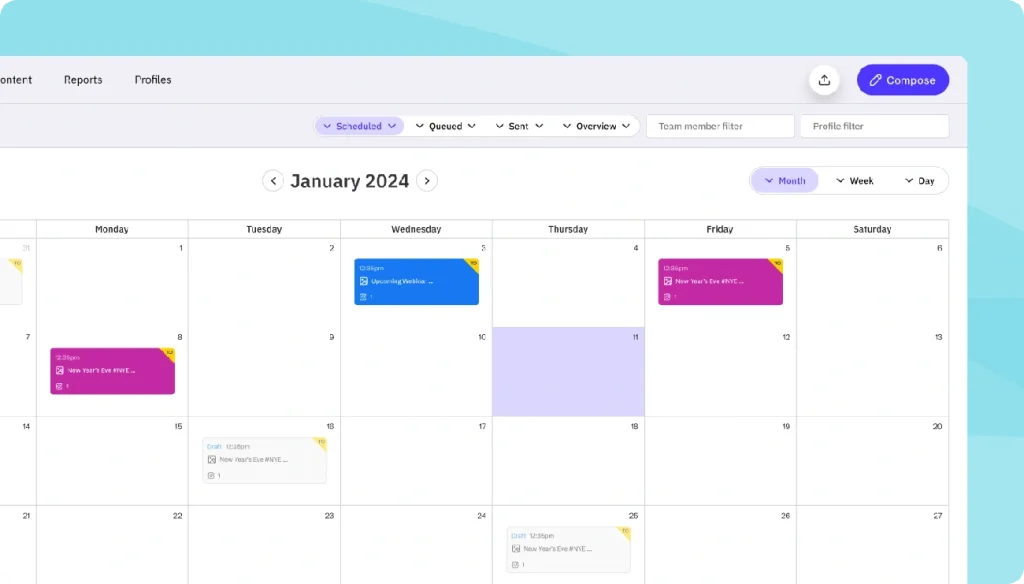
Image Source: www.sendible.com
Over 30,000 agencies, marketers, and brand managers rely on Sendible to manage social media at scale. The platform targets agencies and small businesses that need to handle multiple client accounts without drowning in browser tabs. Sendible supports Facebook, Instagram, TikTok, X, LinkedIn, Google Business Profile, YouTube, Threads, and Bluesky. This gives you coverage across every platform your clients use.
Key Features
The Smart Compose Box centralizes scheduling across all platforms from one interface. You create tailored posts for multiple networks at once and customize copy and media for each platform’s requirements without switching dashboards. Priority Inbox unites comments and messages from connected accounts into a unified feed. You can assign conversations to team members and respond without logging into individual platforms.
Bulk Import uploads months of content via CSV files. This enables you to schedule hundreds of posts, customize them, request approvals, and program publishing dates in one session. AI Assist generates platform-specific captions and optimizes copy directly within the compose box. Sendible users report saving approximately 50% of the time previously spent on social media management.
White Label capabilities on Advanced and Enterprise plans let agencies rebrand the entire platform with custom domains, colors, and support pages. Integrations include Canva for design and Dropbox and Google Drive for asset storage, plus Pexels and GIPHY for royalty-free content.
Pricing
| Plan | Monthly Cost | Users | Social Profiles |
|---|---|---|---|
| Creator | $29 | 1 | 6 |
| Traction | $89 | 4 | 24 |
| Scale | $199 | 7 | 49 |
| Advanced | $299 | 20 | 100 |
| Enterprise | $750 | 80 | 400 |
Annual billing provides 15% savings. Nonprofits receive 15% monthly or 25% annual discounts.
Pros and Cons
Live chat support operates during UK business hours with helpful responses. The interface earns praise for ease of use, with quick setup across multiple accounts. Campaign Management and Custom Tags enable bulk personalization while maintaining brand consistency.
Costs escalate when scaling beyond simple tiers. Analytics remain less resilient than dedicated tools.
Best For
Sendible works best for agencies managing 5+ client accounts who need white-label reporting and bulk scheduling capabilities. Small business teams handling multiple brands benefit from the workspace separation and approval workflows.
Later
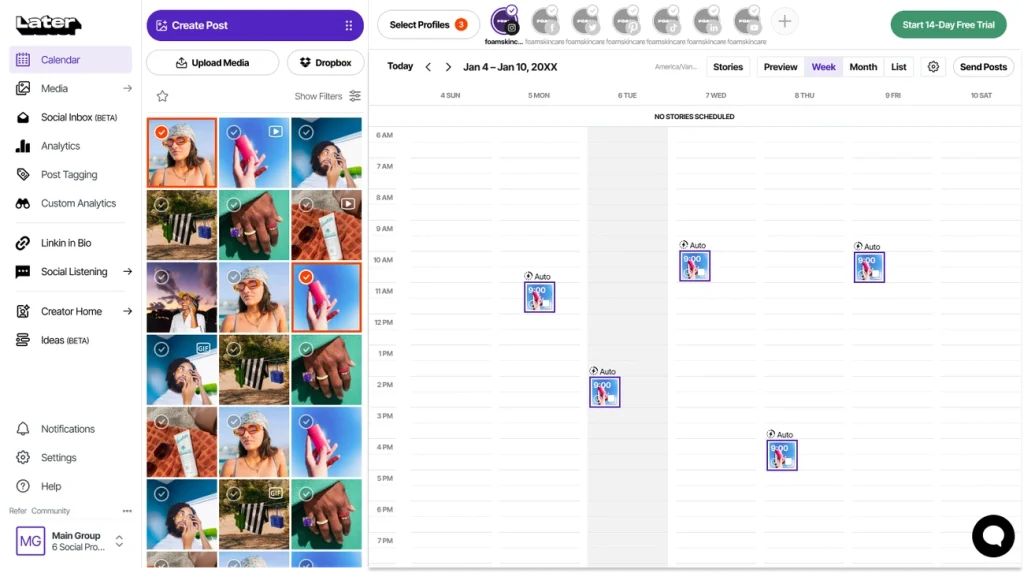
Image Source: Later
Later emerged from Instagram’s visual ecosystem and built its reputation on one core strength: letting you see how your feed will look before posting. The Visual Planner displays your upcoming posts in grid format, where you drag and drop content until the esthetic matches your vision. This preview eliminates the guesswork about color patterns, spacing, and visual flow that Instagram-focused brands need.
Key Features
The platform supports Instagram, TikTok, Facebook, Pinterest, LinkedIn, X, YouTube, Threads, and Snapchat. Link in Bio creates a clickable landing page behind your profile link and turns static posts into traffic drivers for products and blog content. Team collaboration and content approvals are available on Growth plans and higher, with internal review workflows and external sharing for stakeholder feedback without requiring Later logins. The Social Inbox unites comments and DMs from multiple platforms, while AI tools generate captions and content ideas. Best Time to Post recommendations optimize scheduling based on audience engagement patterns.
Pricing
| Plan | Monthly Cost | Social Sets | Posts/Profile | Analytics | Users |
|---|---|---|---|---|---|
| Starter | $18.75 | 1 (8 profiles) | 30 | 3 months | 1 |
| Growth | $37.50 | 2 (16 profiles) | 180 | 1 year | 2 |
| Scale | $82.50 | 6 (48 profiles) | Unlimited | 2 years | 4 |
Annual billing provides 25% savings.
Pros and Cons
The Visual Planner remains unmatched for Instagram esthetic planning. Link in Bio integration eliminates separate tools. The mobile app supports full scheduling functionality.
Post limits on Starter (30 per profile each month) restrict active accounts. Instagram auto-publishing requires a Facebook Business account connection, which some users find cumbersome. Analytics on lower tiers lack depth compared to dedicated tools.
Best For
Later works best for Instagram-first brands, e-commerce shops using visual content, and creators posting once per day who prioritize feed esthetics over posting volume.
Conclusion
The right social media scheduler for your small team depends on your specific workflow and budget constraints. Sprout Social delivers enterprise features if you can justify the investment. Buffer keeps things simple for solo creators and small accounts. Planable excels at approval workflows for agencies. Loomly balances collaboration with affordability. CoSchedule suits content-heavy teams that manage multiple channels, and Sendible handles bulk scheduling at scale. Later focuses on Instagram esthetics.
Pick the tool that solves your biggest pain point rather than the one with the most features. Start with a free trial and test it with your actual workflows.